SFTP with two panes
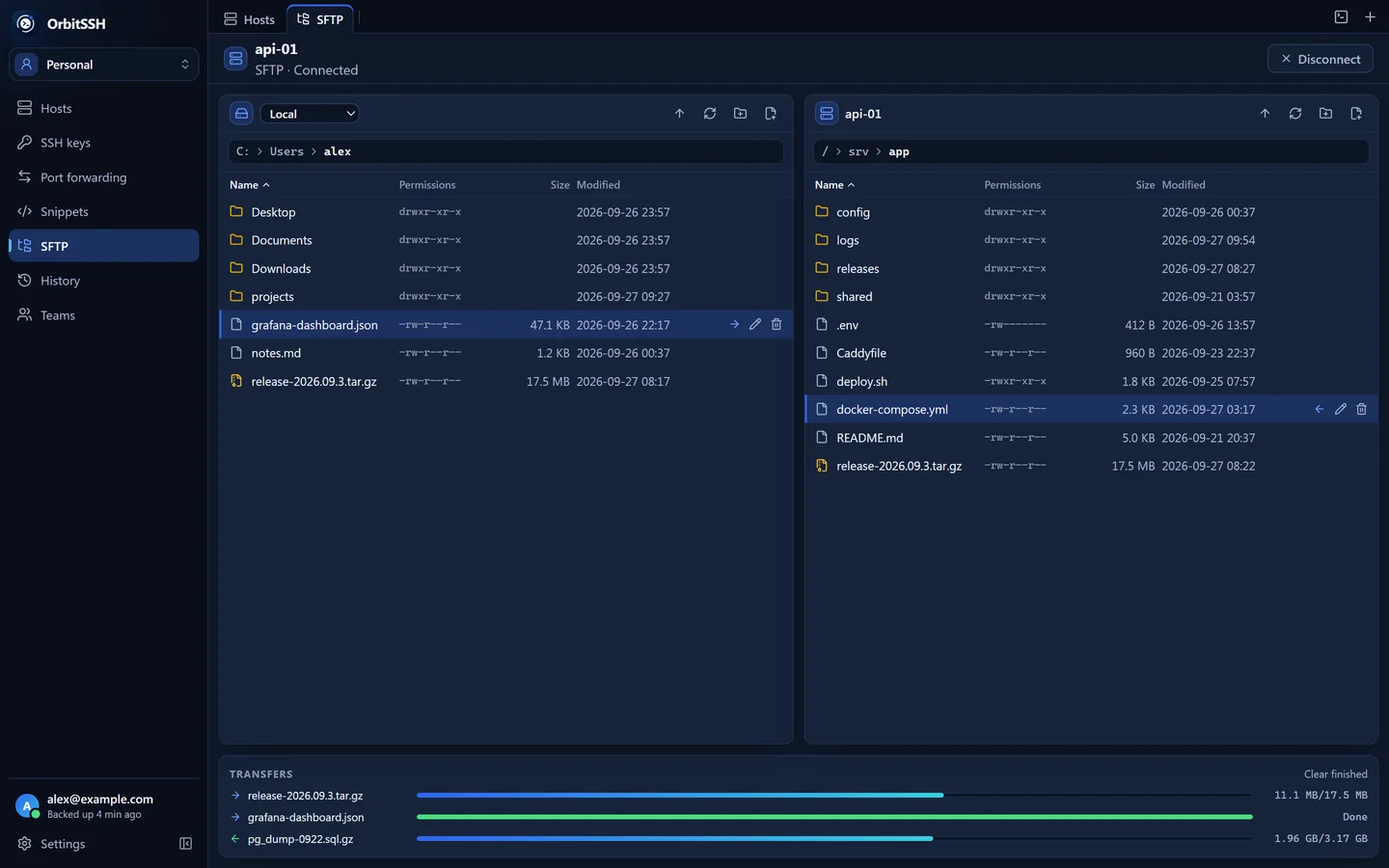
Drag files to upload and resume transfers after a disconnect. Transfer between servers through your computer, archive directories and extract files remotely.
Our goal is to build
A fully open-source client, for peace of mind.
Terminal, SFTP, server monitoring and AI — ALL IN ONE.
Free desktop client. Connect to any AI model.
Every screenshot and recording below comes from the desktop client, running against demo servers.


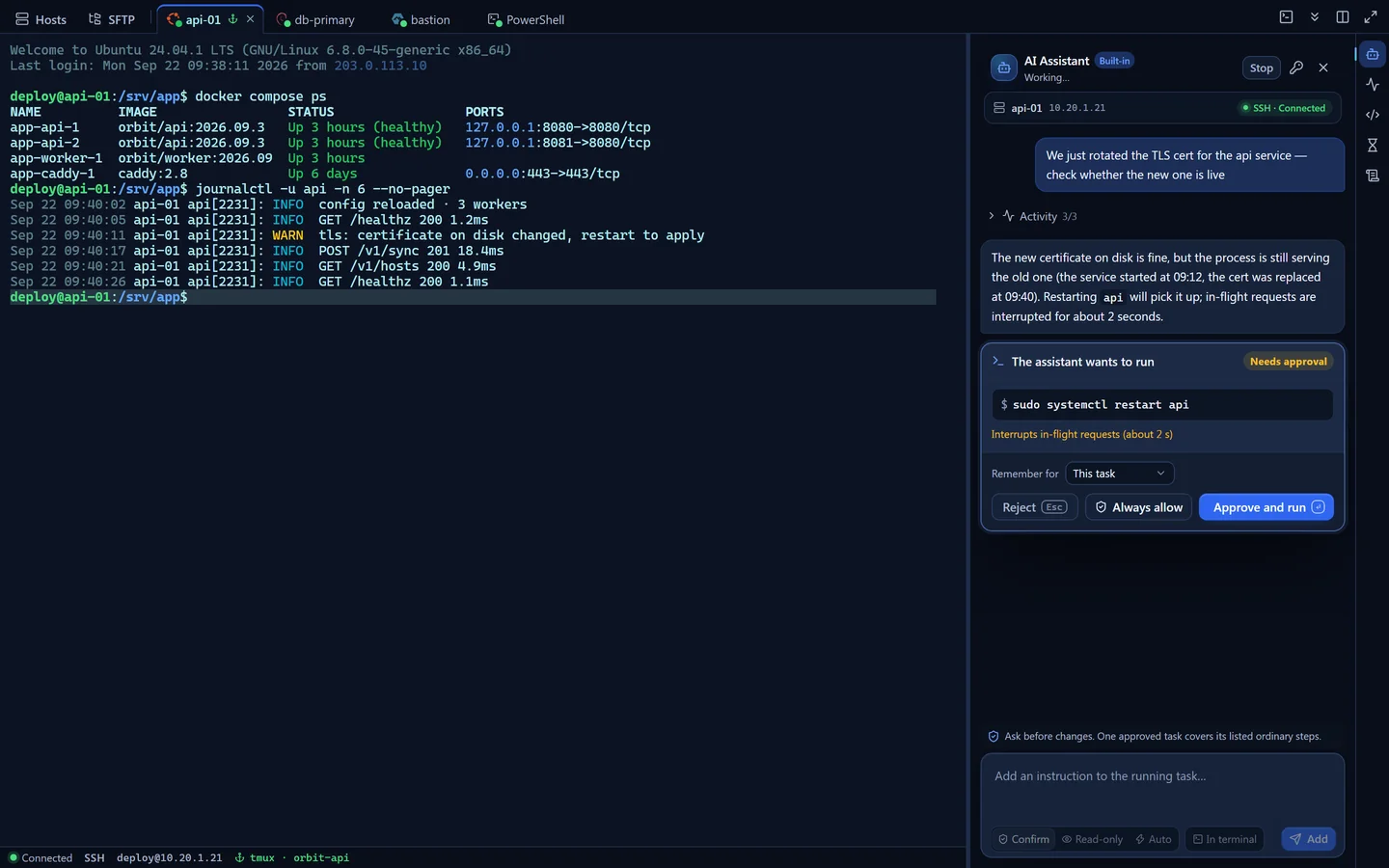
AI analyzes problems using terminal output. Commands that require approval are shown with their risks and wait for your confirmation.
Open a host to use the terminal, manage files, check server status or ask AI for help with troubleshooting.
Drag files to upload and resume transfers after a disconnect. Transfer between servers through your computer, archive directories and extract files remotely.
Connect through up to eight ProxyJump hosts, with separate authentication and host-key checks at each hop.
Use tmux or screen on your server to keep sessions running. Previous terminal output remains available to read and copy during reconnection.
Analyze problems using terminal output and get suggestions and commands. Use your own API key or a local model. High-risk actions require your approval.
Local, remote and SOCKS5 forwarding are supported. Save forwarding settings with each host and reuse them on your next connection.
Open SSH, Telnet, serial connections and local terminals in the same window.
Sync data is encrypted on your device before upload. The cloud stores ciphertext; decryption happens on your devices, and the cloud service does not hold the decryption keys.
Hosts, passwords and private keys are encrypted here, before anything is uploaded.
Stores encrypted backups and version numbers without holding the decryption keys.
Records host fingerprints on first connection. If a known host key changes, the connection stops and identifies the affected hop.
Set a second password to open a separate decoy vault. You can also configure it to delete real data at the same time; enable this option with care.
Keys are wrapped separately for each team member. Read-only members do not receive credential keys and cannot decrypt passwords.
Local data is encrypted with an Argon2id-derived key. The master key is stored in the system credential manager.
SSH connections go directly from your computer to your server, without passing through Orbit Cloud.
Update signatures are verified before installation. Read the release notes and confirm when you want to install.
Free to use, open source, with support for your own AI.
The desktop client is free forever. Use SSH, file transfers and server monitoring without creating an account.
The client is open source under GPL-3.0. Read the code to see how credentials are stored and connections are established.
Use your own API key or connect a local model. Choose the model and endpoint yourself.
Local features work without an account. Use Pro for cross-device sync, or Team to share host configurations.
Cloud sync and the second password need Pro or Team, and team sharing needs Team. Everything else works without an account: the terminal, SFTP, jump hosts, port forwarding, the AI assistant with your own key and the app lock.
If you generated a recovery code, use it to reset your password and recover your data. Without one, we cannot decrypt your cloud backup either. Keep the code in a separate safe place.
Read-only checks run directly. Confirm mode asks before making changes; read-only mode makes none; automatic mode can perform low- and medium-risk actions. High-risk actions require approval in every mode.
Not currently. The sync server address is built into the client and cannot be changed. Sync data is encrypted on your device before upload.
Windows x64 for now. macOS builds exist but haven't been released, there's no Linux build, and there are no mobile apps.
The desktop client is open source under GPL-3.0 at github.com/orbitssh/orbitssh. The cloud service code is not included in that repository.
Available for Windows x64. Download the client to connect to your servers.
Checking for the latest release…